How to Fund Your Zoqo Account via Polymarket Bridge
How to deposit crypto into Zoqo with Polymarket Bridge: email sign-in, picking a token and chain, the minimum deposit, status, and when pUSD arrives.

To fund a Zoqo account, sign in with your email, click Deposit in the header, pick a token and a chain, and send crypto to the address Zoqo shows you. Polymarket Bridge converts what you send into pUSD on Polygon, the collateral Polymarket uses for trading, and credits it to your Polymarket Deposit Wallet. Zoqo has no card or bank on-ramp, so you need crypto to start.
How do you sign in to Zoqo?
Email is the only way to sign in. You enter your address, Zoqo sends a six-digit one-time code to that inbox, and you type or paste the code to finish. There is no password and no social or wallet login; Privy runs the sign-in.
New accounts also tick a box during signup acknowledging Polymarket's geoblock and view-only restrictions.
What happens after your first sign-in?
Zoqo sets up your Polymarket Deposit Wallet and trading credentials in the background right after your first sign-in, and retries by itself if a step fails. Open the deposit window before that finishes and you'll see "Setting up your deposit wallets..." where the address would be.
How do you deposit crypto into Zoqo?
- Click Deposit in the header. The button shows once you are signed in and opens a window called Deposit Crypto, with your current balance under the title.
- Choose what you are sending from the Tokens menu.
- Choose the network you are sending on from the Chains menu. The minimum for that pair appears next to it as "Min" and a dollar amount.
- Copy the address under "Your deposit address" with the Copy address button, or scan the QR code.
- Send at least the minimum from your wallet or exchange, on the same chain you picked.
- Keep the window open until the status card says the deposit is complete.
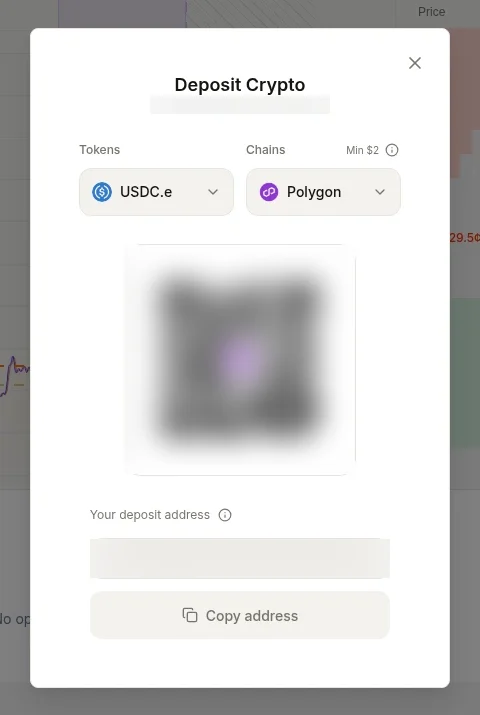
The Deposit Crypto window with Tokens set to USDC.e and Chains set to Polygon. The QR code, deposit address, and balance are blurred. Min $2 is what Bridge showed for this pair when the screenshot was taken.
The info icon beside the address carries a short note: any accepted token sent there is swapped to pUSD in your account.
Which tokens and chains can you deposit?
The menus are filled from Polymarket Bridge's live list of supported assets, so they change when Bridge's list changes. Zoqo shows the EVM chain options from that list. With USDC.e selected, the Chains menu lists only Polygon, because Zoqo offers USDC.e only on Polygon. Other tokens can list additional EVM chains when Bridge supports them. Bridge itself also takes Solana, Bitcoin, and Tron deposits, which the Zoqo window doesn't offer.
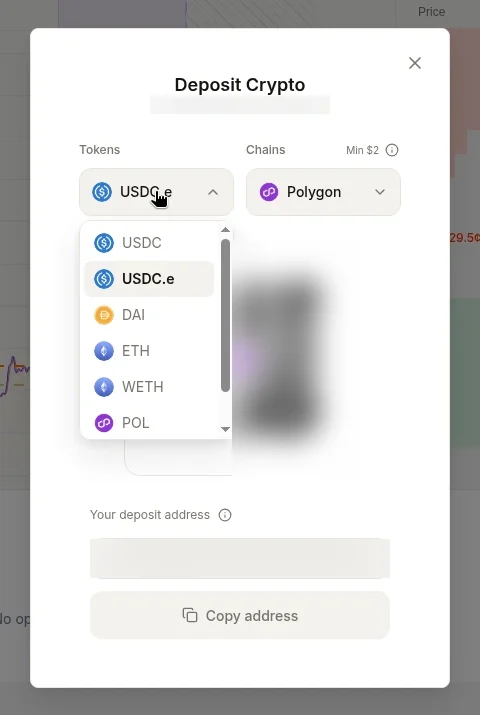
The Tokens menu with USDC.e selected. This capture shows USDC, USDC.e, DAI, ETH, WETH, and POL, with USDT below the fold.
The window opens on USDC.e on Polygon when Bridge lists that pair, and on the first available option when it doesn't. If you hold something else, set both menus before copying the address so the minimum and the status tracking match what you send.
What is the minimum deposit?
Each token and chain pair has its own minimum, set by Bridge and shown next to the Chains menu. Polymarket's deposit docs say deposits below the minimum will not be processed. Its supported-assets page lists a higher minimum for Ethereum mainnet than for Polygon, Base, or Arbitrum.
How long does a Zoqo deposit take?
Polymarket says Bridge transfers typically finish within a few minutes, but network conditions can slow them down. While the Deposit Crypto window is open, Zoqo checks Bridge every two seconds and shows a status card that steps through Detected, Processing, Confirmed, Submitted, and Complete. At the last step the card reads "Deposit complete" and your balance refreshes.
The status card only appears during a real transfer, so there is no screenshot of it here. Zoqo only checks while the window is open. Closing it stops the updates, while Bridge keeps processing the transfer on its side. Reopen Deposit while the transfer is still in flight and the card picks it up again. Completed deposits also show in your activity history.
Tip
Before you send from an exchange, check that its withdrawal network matches the Chains menu. Polymarket warns that funds sent from an unsupported chain or in an unsupported token may not be recoverable.
What if a deposit fails?
The card switches to "Deposit failed" and says to try again, or to contact support if you already sent funds to the address. Polymarket's status docs send failed, stuck, or compliance-held transfers to its Bridge provider's support. For a wrong-token deposit there is a recovery tool at recovery.polymarket.com, though Polymarket warns that unsupported tokens can be lost for good.
What is pUSD?
pUSD (Polymarket USD) is the token on Polygon that Polymarket uses as collateral for all trading. Bridge converts every deposit to pUSD, and USDC or USDC.e is wrapped into pUSD on arrival. A complete Yes and No set in a market is backed by 1 pUSD, which how prediction markets work explains.
Can you deposit to Zoqo with a card or bank transfer?
No. Zoqo has no card or fiat on-ramp. To start from dollars, buy a token listed in the deposit menus on an exchange or wallet app, then send it to your deposit address. Polymarket's fee docs say it charges nothing to deposit USDC, but exchanges and other intermediaries can charge their own fees.
Can you deposit from a restricted region?
No. Zoqo follows Polymarket's geoblock and enforces it on its server. In a restricted region the app is view-only, with a banner and a "See restricted locations" link. The deposit menus are disabled and no deposit address is issued, but you can still browse markets.
Frequently asked questions
Which token should I send?
Send whatever you hold, as long as it appears in the Tokens menu for the chain you are sending on and meets the minimum.
What happens if I send less than the minimum?
Bridge does not process deposits below the minimum, according to Polymarket's docs. The "Min" amount next to the Chains menu changes with the token and chain, so check it before you send.
What should I read before my first trade?
Start with how Polymarket's BTC Up/Down markets work and how the five timeframes differ. The guides to taker fees and the order book explain what a trade costs and why the displayed price isn't always your fill.