Placing Your First Trade on a BTC 5-Minute Up/Down Market
How to place a market order on a BTC 5-minute Up/Down market in Zoqo: pick 5m, fill in the ticket, read To Win and fees, and check what filled.

To place your first trade on a BTC 5-minute Up/Down market in Zoqo, open Market on a desktop browser, pick 5m, and open the live window. Leave the ticket on Buy and Market, choose Up or Down, and type a dollar amount of at least $1. Check To Win and Avg. Price, then click Buy Up or Buy Down. Zoqo sends a market order to Polymarket that buys what the order book offers at that moment and cancels the rest.
What do you need before your first trade?
- Cash in your account. If your balance is $0, start with how to fund your Zoqo account.
- A desktop browser. Phones and tablets get an "Available on desktop" screen instead of the app.
- An eligible location. Zoqo follows Polymarket's regional restrictions, and in a restricted region the app is view only. A banner links to "See restricted locations", and the ticket reads "Trading is unavailable in view-only mode."
Each 5-minute market asks whether Bitcoin ends the window at or above where it started, and winning shares pay $1. How Polymarket's BTC Up/Down markets work covers the rules.
How do you open a BTC 5-minute market?
- Click Market in the top navigation.
- In the timeframe pills next to BTC (5m, 15m, 1h, 4h, 1d), click 5m.
- Find the window marked Live in the strip above the chart, with its end countdown and a View Market button. Later windows sit to its right, and the chart shades that area NOT YET TRADED.
- Click View Market to open the trade page. The Markets page has the same ticket on the right if you'd rather trade from there.
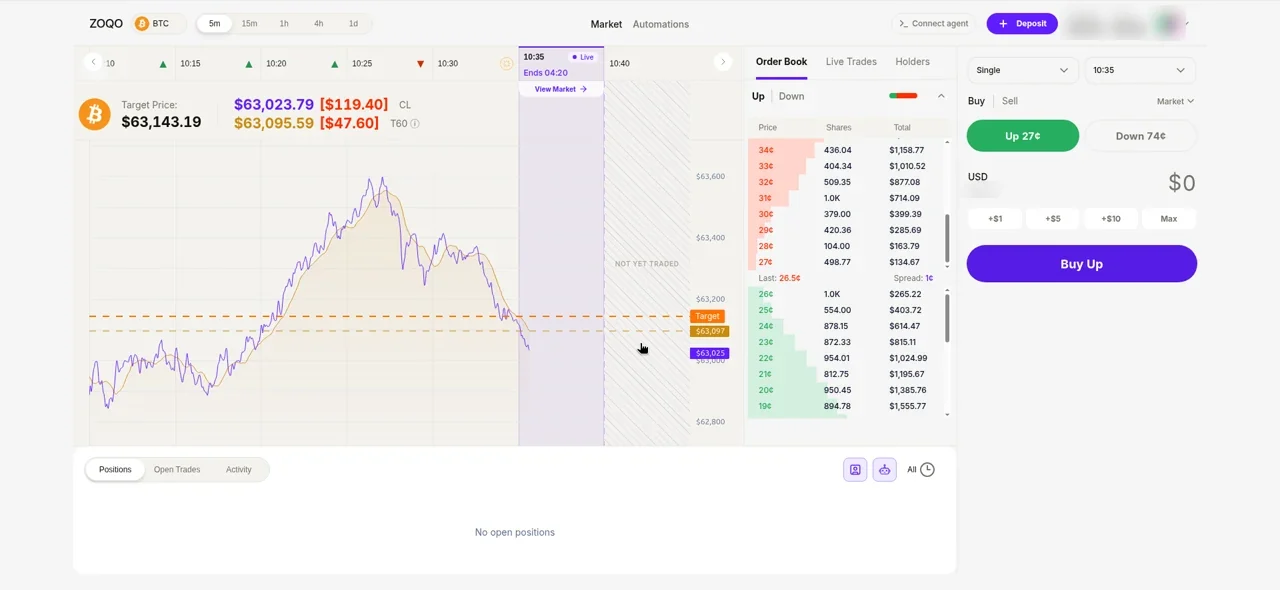
The Markets page with 5m selected. The 10:35 window is live, and the area after it is marked NOT YET TRADED. Account balances are blurred.
What the trade page shows
The header gives the window (for example "Nov 23, 10:35-10:40 EST"), a countdown, and the Target Price, which is the price to beat. CL is Chainlink's current BTC price and T60 is a 60-second average (TWAP).
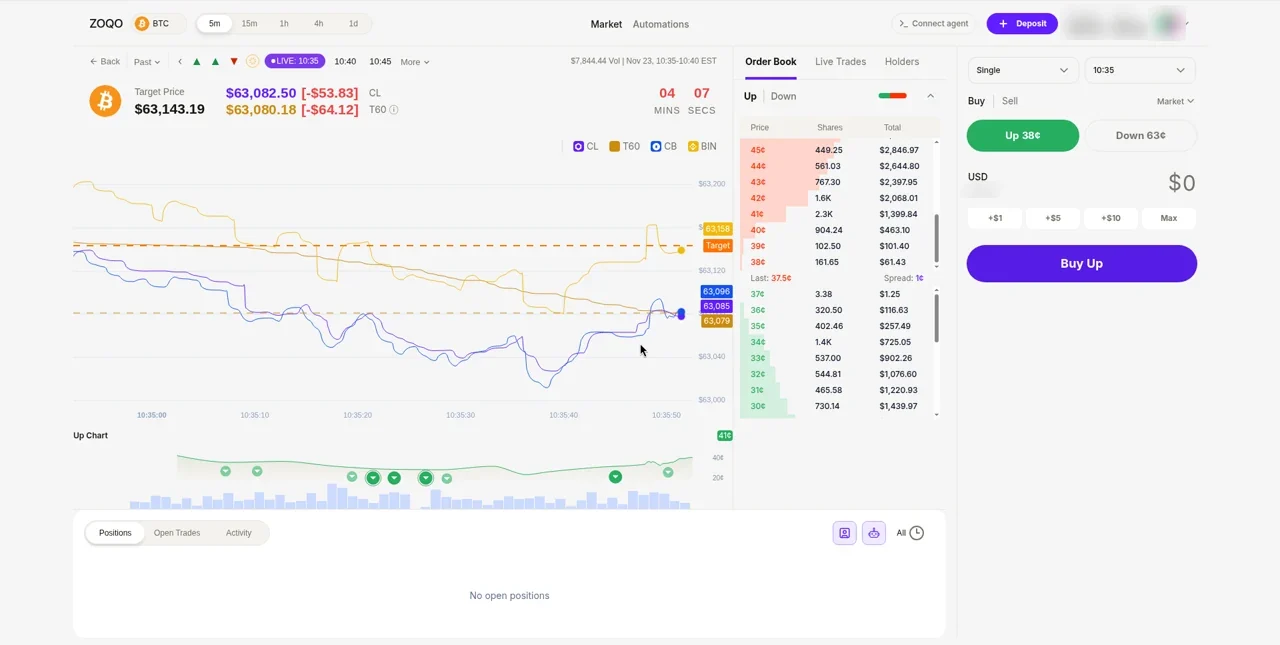
The trade page for one 5-minute window, with about four minutes left. The ticket opens on Buy, Up, and Market with a $0 amount. Account balances are blurred.
Polymarket's rules resolve the window Up if Chainlink's BTC/USD TWAP-60s price at the end is greater than or equal to the price at the start, and Down otherwise, so an exact tie goes to Up. How Polymarket's order book works explains why the price on a button isn't always your fill.
How do you fill in the order ticket?
- Leave the top dropdowns on Single and the live window's start time. The other option, Bulk Order, spreads one order across upcoming windows.
- Keep Buy selected. Sell is for shares you already hold.
- Keep the order type on Market. The same dropdown has Limit and One Tap. One Tap sends an order the moment you tap an amount, so avoid picking it by accident.
- Click Up or Down. Each button shows its current price, such as "Up 27¢" and "Down 74¢".
- Type an amount in USD, or build it with +$1, +$5, +$10, or Max. Market buys have a $1 minimum.
- Read To Win and Avg. Price below the amount.
- Click Buy Up or Buy Down.
If the amount is more than your cash, the main button turns into Deposit.
Up and Down usually add up to slightly more than $1, as 27¢ and 74¢ do here. Each button shows the cheapest ask on its side, and the extra cent is the spread.
What do To Win and Avg. Price mean?
Avg. Price is the best ask on your side right now, and the ticket uses it for the estimate. To Win is your amount divided by that price. A winning share pays $1, so To Win is both your share count and your payout if your side wins, with your stake included.
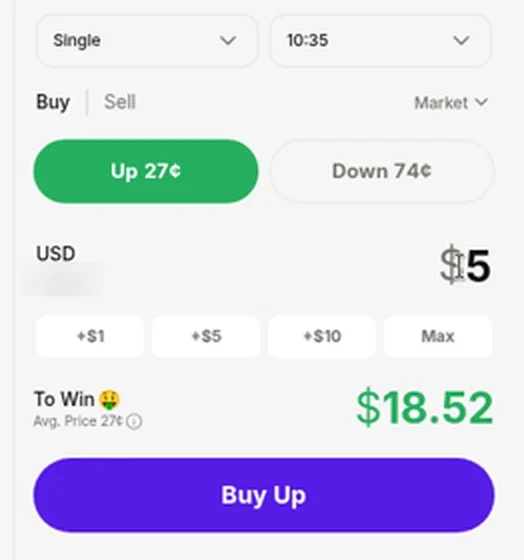
A $5 market buy on Up at 27¢. To Win shows $18.52, the payout if Up wins and the full amount fills at that price. The order was not submitted, and the cash balance is blurred.
A worked example
These are the numbers in the screenshot above, from one moment in one market:
- Amount: $5 on Up at an Avg. Price of 27¢.
- Shares: $5 ÷ $0.27 = 18.52, so To Win shows $18.52.
- If Up wins and the whole order fills at 27¢, the shares pay $18.52, or $13.52 more than you spent before fees.
- If Down wins, the shares pay $0 and you lose the $5 plus fees.
On a 5-minute market these figures can change while you type. An earlier load of the same ticket showed 23¢ and $21.74.
Tip
To Win assumes your whole amount fills at the Avg. Price on screen. The message after you submit shows the shares and average price you actually got.
Where are the fees?
The ticket has no fee line, and To Win doesn't subtract fees. Fees are charged in pUSD when the order matches, on top of what you spend on shares:
- Polymarket's taker fee is shares × rate × price × (1 − price). Polymarket's fee docs list a rate of 0.05 for BTC 5-minute and 15-minute Up/Down markets from November 20, 2026, which comes to about $0.18 in the example.
- Zoqo's builder fee. Polymarket lets apps that route orders add one on top of its own fee.
Your portfolio shows the two combined as "Fees paid (24h)". Polymarket taker fees explains why the fee is largest near 50¢.
What happens after you click Buy?
Zoqo sends market orders as fill-and-kill. The order buys from sellers at the prices available, up to your amount, and Polymarket cancels the part it can't fill straight away. Nothing rests on the book, so the order never appears in Open Trades.
The ticket then shows one of these results:
- Filled: "You bought [shares] UP shares for [amount] ([avg. price])."
- Partially filled: "Your order was partially filled", with what you bought and how much remains unfilled. You pay only for the filled part, plus its fees.
- Unfilled: "Your buy order wasn't filled because no sellers matched your price."
- Failed: the order didn't go through, with Polymarket's reason when it gives one.
Partial fills are common when the book is thin. Your shares show up in the Positions tab under the chart, and the trade shows up in Activity.
What happens when the 5-minute window ends?
When the window closes, trading on that market stops and the ticket says "This market window has closed." Polymarket then resolves it from the Chainlink price. Winning shares are worth $1 each, and Zoqo redeems winning positions automatically. Losing shares are worth $0.
You can also sell before the window ends by switching the ticket to Sell. To compare 5m with longer windows, see the five BTC Up/Down timeframes.
Frequently asked questions
What is the minimum trade on a BTC 5-minute market?
A market buy on Zoqo needs at least $1, and below that the ticket shows "Minimum spend is $1." Limit orders have a minimum in shares instead.
Can I cancel a market order?
No. It fills what it can on arrival and Polymarket cancels the rest at once, so nothing stays open. A limit order is the way to wait for a price.
Does To Win include fees?
No. Polymarket's taker fee and Zoqo's builder fee are charged on top when the order fills, so the trade costs your amount plus fees.
Does trading through Zoqo change my odds?
No. Your order goes to Polymarket's order book like any other. The result depends on where Chainlink's BTC/USD price ends the window, and your fill depends on the book when you submit.