Market vs Limit vs One Tap Orders on Zoqo
How Zoqo's three order types work on BTC Up/Down markets: market orders that fill and kill, limit orders priced in cents, and One Tap instant buys.
Zoqo's order ticket has three order types for BTC Up/Down markets. A Market order buys what the order book offers right now and cancels the rest. A Limit order names your price in cents and waits on the book until it fills, you cancel it, or the market window ends. One Tap turns the ticket into three dollar buttons that each send a market order the moment you click them.
Where do you pick the order type?
The order type is a dropdown on the ticket, to the right of Buy | Sell. It starts on Market, and the list has Market, Limit, and One Tap. The rest of the ticket changes with it: Market asks for dollars, Limit for a price and a share count, and One Tap swaps the amount box for buttons.
How does a market order work on Zoqo?
You type an amount in USD, or build it with +$1, +$5, +$10, or Max. The minimum is $1, and below that the ticket shows "Minimum spend is $1." To Win and Avg. Price appear under the amount.
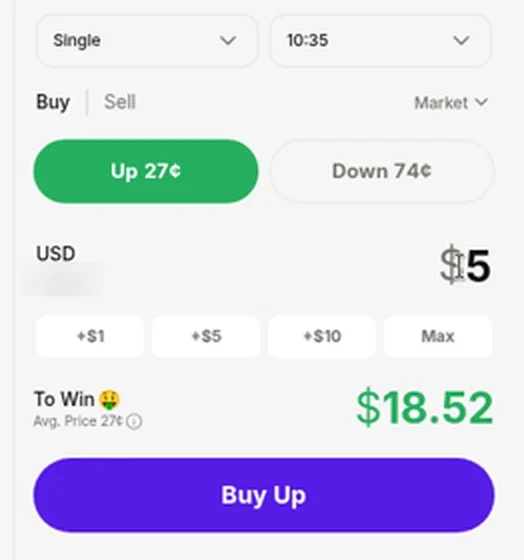
A $5 market buy on Up at 27¢ in a BTC 5-minute window. The order was not submitted, and the cash balance is blurred.
Zoqo sends market orders to Polymarket as fill-and-kill (FAK). The order takes sellers' shares up to your amount, and Polymarket cancels whatever can't fill straight away. A partial fill is a normal result when the book is thin, and the ticket says so: "Your order was partially filled", followed by what you bought and how much remains unfilled. You pay only for the filled part.
Market orders never rest, so they never show up in Open Trades and there is nothing to cancel.
Is the To Win estimate guaranteed?
No. Avg. Price on a market ticket is the best ask on your side when you look, and To Win is your amount divided by that price. A larger order can run past the best ask into higher prices, and on a 5-minute market the ask can move while you type. The message after you submit shows the shares and average price you actually got. How Polymarket's order book works explains why.
How do limit orders work on Zoqo?
Choose Limit and the ticket adds a Limit Price field in cents, with − and + buttons. The price starts at the button price for your side and follows it until you set your own. Clicking a price in the order book also switches the ticket to Limit at that price.
The amount box switches from USD to Shares, with +10, +25, +50, and +100 chips. Polymarket sets a minimum size for resting orders, and on the BTC Up/Down markets it has been 5 shares, so a smaller order gets "Minimum order is 5 shares." The summary shows:
- Estimated Total Cost: shares times your limit price.
- To Win: your share count, since each winning share pays $1.
- Avg. Price: your limit price.
- Cash Bal: what you have available.
Click Buy Up or Buy Down to send it. The ticket confirms "Your limit buy order for [amount] at [price] is being placed", and the order then shows in Open Trades while it waits on Polymarket's book. A limit buy never pays more than your price per share. If your price is at or above the best ask, the matching part fills right away and only the rest waits.
Where do you edit or cancel a limit order?
Open orders sit in the Open Trades tab under the chart, labeled like "Limit Buy @ 40¢" with the share count and current price.
- Edit opens "Edit Limit Order", where only the limit price can change. Zoqo cancels the original and places a replacement for the same number of shares. If the replacement fails, the original stays cancelled.
- Cancel asks you to confirm, since it can't be undone. Cancel All cancels every order in the list at once.
- Once part of an order has filled, Edit goes away and the row offers Cancel and Sell.
What happens to a limit order when the market window ends?
Zoqo cancels any limit order still open when its market window ends. The order leaves Open Trades as the window closes, and Zoqo cancels it on Polymarket within about 30 seconds. If the order partly filled, you keep the shares that filled and the rest is cancelled. Nothing carries over to the next window, so place a new order there if you still want one.
A 5-minute market leaves little time for a fill, especially at a price well below the ask. Limits get more time on the 1h, 4h, and 1d markets, covered in the five BTC Up/Down timeframes.
Do limit orders pay fees?
A limit order that rests and is later filled by someone else makes you the maker, and Polymarket charges makers no fee. The part of a limit order that fills straight away is a taker trade, like a market order. Polymarket's taker fee is shares × rate × price × (1 − price), and its fee docs list a rate of 0.05 for BTC 5-minute and 15-minute markets and 0.01 for the other BTC timeframes. Polymarket taker fees covers the rest, including builder fees.
What does One Tap do?
One Tap replaces the amount box with three buttons, $1, $5, and $10, and each shows an "Earn" figure: the payout if your side wins at the current price. Clicking a button sends a market order for that amount immediately. There's no review step and no Buy button to press, so a stray click is a real trade.
The orders are ordinary market orders, so they can fill partly and the Earn figure is an estimate in the same way To Win is. The Edit button under the chips lets you change the three amounts. Leaving One Tap resets them to $1, $5, and $10.
Tip
One Tap buys whichever outcome is selected, Up or Down. Check which one is highlighted before you click a button.
Which order type should you use?
- Market when you want to be in the trade now and can accept the price the book gives you.
- Limit when you have a price in mind and can live with no fill.
- One Tap when you've already chosen a side and want several small buys quickly.
If you haven't placed a trade yet, start with your first trade on a BTC 5-minute market.
Frequently asked questions
Can I cancel a market order?
No. It fills what it can when it arrives and Polymarket cancels the rest at once, so nothing stays open.
Why didn't my limit buy fill?
No seller offered shares at your price, or at a lower one, before the window ended. Zoqo cancels whatever is left unfilled at the close.
Can I change the share count on an open limit order?
No. Edit only changes the price. To change the size, cancel the order and place a new one.
Does One Tap work for selling?
No. The One Tap buttons only appear when the ticket is on Buy. To sell, switch to Sell and use Market or Limit.